My Training Account
Need Help?
Step-by-step instructions below to set up your user account and password to access the HMM modules
Need Help?
Thank you for enrolling in the Harvard ManageMentor (HMM)© e-Learning course tailored for IATA students.
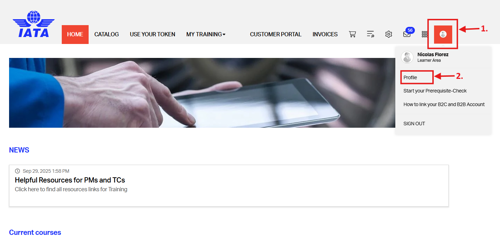
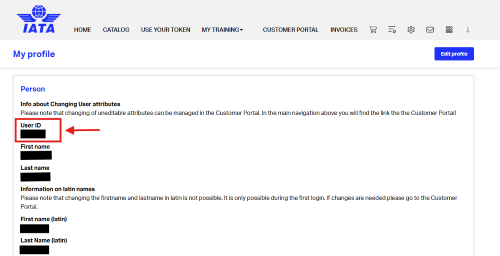
- Find your ‘User ID’ from your IATA Training User Account.
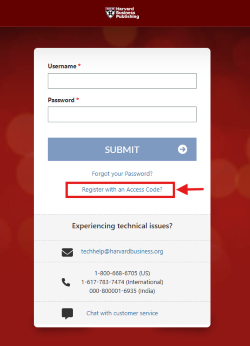
- Go to https://myhbp.org/home/login
- Use the option ‘Register with an Access Code’
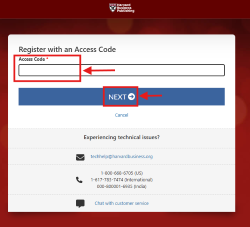
- Enter the following code: ITDI296484HMM
- Click on ‘NEXT’
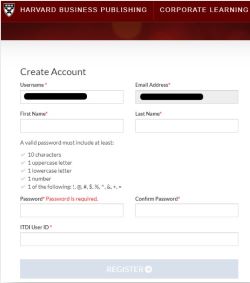
- The system will ask you to insert an email address to determine if you are an existing user or not. If you are not, you will have to create an account. Fill out the required fields (* = required) on the screen and then click on ‘Register’. Please take note of following:
- It is strongly recommended to use your personal email address as Username
- Enter the User ID obtained from your IATA Training User Account in Step 1 in the “ITDI User ID” box
- Write down your Username and Password for the next step
- Go to www.iata.org/hmm-login to access HMM with your login credentials (Enter your Username and
Password created in Step 3).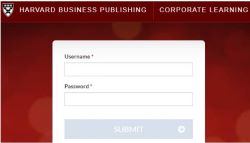
- You are now successfully registered for the Harvard ManageMentor e-Learning course. The course access is valid for six months.
For any registration issues or questions, please contact IATA Training.
For any technical issues or questions, please contact Harvard Business Publishing tech support team by e-mail at techhelp@hbsp.harvard.edu.
We wish you all the best in your studies!